


Phone Tracker
4.0705.00 Reviews
App Specs
- Version
- 1.7.33
- Updated On
- License
- Free
- Downloads
- 10,000,000+
- Developer
- WeFindertools
- Categories
- Maps & Navigation
- Platform
- Android
Screenshots
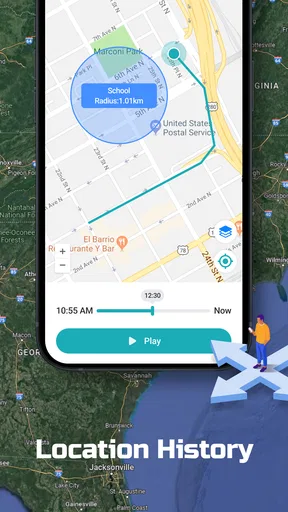
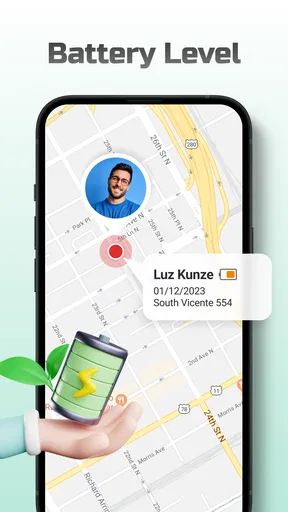
 Analysis by AppCompare
Ever had that moment of panic when you can't find your phone? Or maybe you're a parent wanting to keep track of your kids without constantly asking where they are. Well, that's where Phone Tracker comes in to save the day! This app is designed to help you keep tabs on your devices and loved ones with ease, and let me tell you, it’s quite the lifesaver.
What Exactly is Phone Tracker?
So, Phone Tracker is pretty much what it sounds like. It's a nifty app that lets you track the location of a phone using GPS. Whether you’re checking up on lost devices or just wanting peace of mind about where your friends or family are, this app has got you covered. The interface is super user-friendly, which is a huge plus if you're not exactly a tech wizard.
Setting It Up: No Rocket Science Required
Getting started with Phone Tracker is a breeze. You just download the app from the App Store or Google Play, install it, and follow the setup instructions. You’ll need to allow some permissions (like GPS) for it to work its magic, but once that’s out of the way, you’re good to go. The app does a great job at guiding you through the initial setup, making it almost impossible to mess up.
One practical point to settle before relying on any location-sharing app is who will carry the other device and agree to share its location. A tracker is not a way to locate someone secretly; it works best as a shared arrangement with clear boundaries. I’d explain what the app is for, decide together when checking is reasonable, and make sure everyone understands how to stop sharing or change the arrangement. That conversation matters more than a clever setup, especially with teenagers or other adults.
Phone Tracker is a free Maps & Navigation app from WeFindertools. It is rated for Everyone, has an average score of 4.0 from around 26,000 ratings, and has been installed over 10 million times. Its current version is 1.7.33, and it runs on Android 7.0 or later. Those details make it easy to see that this is an established option rather than an obscure utility, but popularity alone doesn’t tell you whether it fits your household’s habits.
Features That Make Life Easier
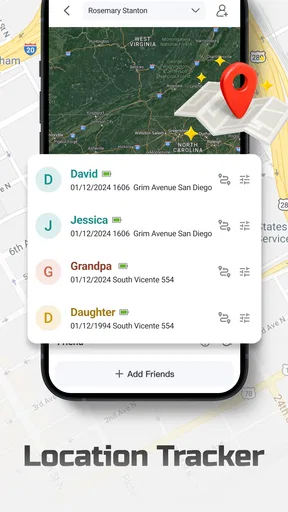
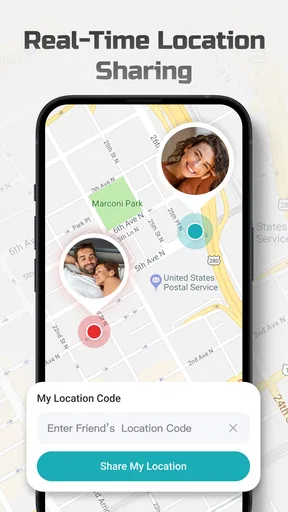
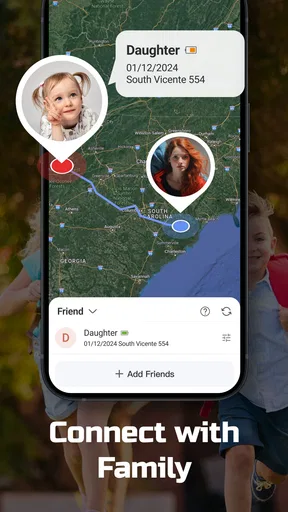
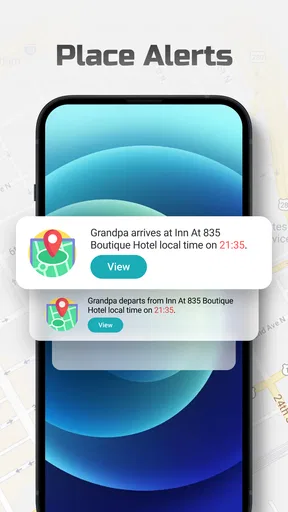
One of the standout features of Phone Tracker is its real-time location tracking. You can see exactly where the phone is on a map, and it updates pretty frequently, so you’re not left wondering if you’re looking at old data. For parents, there’s also the ability to set up geofences. This means you can create a virtual boundary and get alerts when the phone enters or leaves a designated area. Handy, right?
For everyday use, I’d treat a map position as a helpful clue, not a perfect substitute for a phone call. Buildings, weak reception, a phone left in a bag, or a device that is switched off can all make a location less useful than you hope. If a family member is late, the sensible workflow is to check the map once, look at when the position appears to have updated, then contact them if the situation calls for it. Repeatedly refreshing a map rarely gives you more certainty.
Worth Reading Before You Choose

Switching to Android Auto Means Rethinking Your Driving Routine

Google Calendar Makes a Crowded Week Easier to Manage

Baby Panda World Brings Quick Play to Modern Phones, but Its Game Library Feels Busy

ESPN’s Live Game View Makes Following Close Games Easier

QuizzLand Review: A Good Fit for Short Trivia Breaks, Not Every Player

Basketball Stars: Multiplayer Is Fast, but Can It Recover When Matches Go Wrong?
Geofences are most useful when they answer a specific, recurring question. A boundary around a school or a regular destination can save a parent from sending routine “arrived?” messages, while a boundary around a large area may produce alerts that are too broad to be meaningful. I’d begin with one location that genuinely matters, agree on what its alerts mean, and adjust only after seeing how it fits the family’s routine. Too many boundaries can turn reassurance into notification fatigue.
Another feature I appreciated is the app's ability to track multiple devices. If you’re someone who's juggling multiple phones or looking after more than one family member, this feature is a game changer. You can switch between devices with just a tap, and it doesn’t slow down the app at all.
That multi-device view is especially useful when you are coordinating a shared outing. For instance, if relatives are meeting at a busy station, checking the relevant phones can help everyone work out who is already nearby without a chain of calls. I’d still agree on a meeting point first: a dot on a map can show general proximity, but it cannot tell you which exit someone used or whether they can safely stop to read a message. Location helps with coordination; it does not replace a simple plan.
Security and Privacy: Because It Matters
Now, I know what you might be thinking – how safe is this? The developers have put a lot of thought into security, and you can tell. Phone Tracker uses encryption to protect your data, and you’re in control of who can see the location information. It’s a balance between being useful and respecting privacy, which is something I think everyone can appreciate.
Even with location sharing, I’d keep the circle small and revisit it when circumstances change. A parent may have a reasonable need to know whether a younger child reached a destination, but the same level of oversight may feel intrusive as that child grows older. A couple or group of friends may want to share locations during a trip and then stop afterward. Making the purpose and duration explicit is a practical privacy habit, not an obstacle to using the app.
It is also worth thinking through what happens when a phone is misplaced. If the missing device is the one you normally use to check the map, you may need another device already set up to see its location. I would test the arrangement before an urgent moment: confirm that the other participating phone appears as expected and that everyone knows which person can check it. A tracker is most reassuring when the people involved understand the routine before anything goes wrong.
Why You Might Want to Give It a Go
If you’re someone who’s always losing their phone, or a parent wanting to keep an eye on their kids, Phone Tracker is a solid choice. It’s not just about tracking; it’s about reassurance and saving time. Not having to call and ask "Where are you?" every time your teenager is late is a definite stress reliever.
The app’s value is likely to be clearest in the first week, when setting it up and seeing a location on a map feels novel. The longer-term test is whether it reduces a recurring annoyance without asking the family to manage another stream of alerts. I’d judge it by a modest standard: does it prevent a few unnecessary check-ins, or make a planned handoff easier? If the answer is yes, it has a practical role. If everyone forgets it is installed until someone wants to inspect a map, it may not earn a regular place in daily life.
For a realistic weekday example, imagine a child travelling home after an after-school activity while a parent is finishing work. A glance at the location can help the parent decide whether to wait before leaving, and an arrival boundary may answer the routine question without interrupting the child. The useful part is not watching every movement; it is replacing one predictable check-in. If the child’s phone battery is low or the location looks stale, a direct message remains the better next step.
It suits households that already have a clear reason to share locations and can agree on reasonable limits. It is less compelling for someone who only wants to find their own misplaced phone once in a while, because a phone’s built-in locating service may be the simpler tool for that single-device job. It is also not the right choice for anyone seeking covert monitoring. A location app should support an agreed safety routine, not turn trust into continuous surveillance.
Compared with the usual alternatives, Phone Tracker sits between a built-in phone-finding tool and a broader family-safety service. A native device locator is often the more direct choice for finding your own handset, while a map app is better for directions and traffic. Phone Tracker makes more sense when the recurring need is seeing participating phones together and using location boundaries. I would not replace a dedicated navigation app with it: knowing where a person is and finding the best route are different tasks.
Travel is another situation where I can see the appeal, especially when several people are moving around an unfamiliar city. Before relying on it, I’d make sure each person knows how to check the map and agree on a backup meeting point in case a phone runs out of power or loses service. Location sharing can reduce the “where are you?” messages, but it should not be the only plan for separating from a group. For a solo traveller mainly concerned about a lost handset, the built-in locator may be enough.
There are a few questions I would answer before making it part of a routine. Does everyone who will be tracked understand and agree to the arrangement? Is there a specific place or journey where a location check saves time? Who will respond if an alert arrives, and what should they do if the map is unclear? Thinking these through prevents the app from becoming a vague promise of safety. It also makes it easier to decide whether sharing should be temporary or part of a regular family routine.
Maintenance is modest but real: the participating phones need to remain available, location access must stay enabled, and someone should occasionally confirm that the setup still matches the people and places involved. If a child changes schools, for example, an old boundary is no longer useful; if a family stops sharing, the arrangement should be revisited rather than left running by default. I would avoid adding locations just because the option exists. A small, current setup is easier to understand and less likely to generate alerts that everyone learns to ignore.
That is also where fatigue can creep in. A location app may feel reassuring at first, but checking it out of habit can create more worry when a dot pauses or appears in an unexpected place. I’d decide in advance what counts as a reason to act and what can wait for a conversation. If the map becomes a source of repeated suspicion or arguments, stepping back from routine checks is healthier than treating every movement as a report that needs explaining.
For parents, the balance changes as children become more independent. A boundary alert can help with a simple arrival routine, but it cannot assess whether a child is safe, explain a delay, or replace teaching them how to contact someone for help. I see location sharing as a supporting tool rather than a parenting strategy on its own. Used narrowly and discussed openly, it can reduce friction; used as constant oversight, it risks damaging the trust it was meant to protect.
WeFindertools presents a focused idea rather than a replacement for every map or safety tool. The app’s 4.0 average and 705 written reviews offer some context from other users, while its broad reach suggests that phone location is a familiar need. Still, the deciding factor for me is not its visibility in the category but whether the people involved find the routine useful and comfortable. A well-chosen alternative may be better if you need turn-by-turn directions, a one-off device recovery tool, or a different kind of family coordination.
For those of you who travel a lot, the app can also be a great way to ensure you don't misplace your phone in a foreign city. Trust me, having that little extra security can make a world of difference.
Wrapping It Up
In a world where our phones are practically glued to our hands, having an app like Phone Tracker is incredibly beneficial. It's simple, effective, and does exactly what it promises without any unnecessary bells and whistles. Whether you're a tech newbie or a seasoned pro, you'll find this app intuitive and helpful. So, if you haven’t already, give Phone Tracker a whirl. It might just be the peace of mind you've been looking for.
Remember, you can easily download it from the App Store or Google Play, and start tracking with ease. Happy tracking!
Pros
- Accurate location tracking capabilities.
- User-friendly interface design.
- Real-time updates on movement.
- Battery-efficient tracking technology.
- Compatible with most devices.
Cons
- Limited features in the free version.
- Requires constant internet connection.
- Privacy concerns for some users.
- Can be difficult to uninstall.
- Potential for misuse by others.
FAQs for Phone Tracker
How accurate is the Phone Tracker app in locating a device?
The accuracy of the Phone Tracker app largely depends on the device's GPS capabilities and the network connection. Under optimal conditions, such as clear skies and a strong GPS signal, the app can pinpoint a location within a few meters. However, in dense urban areas or indoors, accuracy may vary slightly.
Is the Phone Tracker app compatible with all smartphones?
The Phone Tracker app is designed to be compatible with both Android and iOS devices. However, it's essential to check the specific OS version requirements in the app store. Some features might not be available on older models or operating systems, so verifying compatibility before downloading is recommended.
Does the Phone Tracker app drain the battery quickly?
The app is optimized to minimize battery usage, but it does require GPS and data services to function, which can impact battery life. Users might notice a slight increase in battery consumption, especially if location tracking is active for extended periods. It's advisable to monitor usage and optimize settings for longer battery life.
What privacy measures are in place with the Phone Tracker app?
The Phone Tracker app prioritizes user privacy by implementing strong encryption protocols to protect data. Users have control over who can access their location information, and consent is required before sharing locations. Regular updates ensure compliance with privacy regulations and enhance security features.
Can the Phone Tracker app be used for emergency purposes?
Yes, the Phone Tracker app can be very useful in emergency situations. It allows users to share their real-time location with trusted contacts, ensuring quick assistance if needed. The app also features an SOS button for immediate alerting. However, it should not replace traditional emergency services.


